Best Of
provide ability to add links in a Form
I have a case where when the user opens up the Smartsheet form, if specific conditions are met a link to a file should appear. Currently this is impossible to do. either provide the ability to easily put a link in a field within the form OR embed a form within a form would be ideal. With the link option, we should be able to provide a URL name and the link, the same way the Hyperlink functionality works within a Smartsheet.
 Raven Clarke
Copying Workflows between Sheets
In my operational work I use Sheets as Action Trackers for all the countries we are implementing my project. When I was tracking about 5 countries I got the idea to create workflow that if any task is assigned to me the line is automatically copied to another sheet that is actually my Kanban Board so in one place I can see all my tasks etc. When I had about 10 countires I optimised it so when the action is moved to my kanban sheet with all task in the original one the status changes to "moved" (so I do not have to deal twice with the same task).
So I had to make 10 changes in each country...
Now I have 20 countries that I am tracking... and if any idea comes to me to optimise my workflow I will have to repeat it 20 times.
Can you somehow make it possible to copy Workflows between sheets? / Overwrite or copy as inactive etc. All my sheets look the same (same columns etc.) so I can optimise it only once and with one click button replace the workflow in remaining 19 country sheets.
 kowal
kowal
Re: Important update: Card view deprecation for users on Free plan
UPDATE: As of June 8, 2026, card view has been officially deprecated for all users on Free plans and no longer appears as an option in their view switcher. Board view is now the dedicated home for card-based work visualization in Smartsheet, and we will continue to innovate and invest in this experience. Note: On July 29, 2026, we will deprecate grid view for Free plan users, as the next step in our journey to bring new views to the forefront of our customers’ work.
 Lekshmi Unnithan
Input data into sheet from a document
I love the function of taking data from Smartsheet and generating a pdf. Is there a way to reverse that functionality? For example, this format is easier to work with in a team setting:

But I would like it to be uploaded to feed information back to the sheet in Smartsheet:

Thank you for consideration.
Amy Bedard
I'd love to have a second row of headers
I don't even need them to be all that functional. Just be able to group Columns, allow me to open/close the entire group, and be able to use it in curly brackets to bring the entire group at once into a notification. Sorta like Parent rows, but for columns.
It not only helps with speed of development, but also in the visual organization of a sheet.
 HLChristiansen
Combination Charts for Dashboard
I have several dashboards where I would really need to use a Combination Chart to display my data appropriately. Linking to google sheets or other external sources is not an option for me because my data is housed in Smartsheet and is updated in real time. Having the ability to display a combination line/column chart would be immensely beneficial.
Lmccullough
Re: June Question of the Month - Join the conversation and receive a badge
Recreational Answer
If I could design my own AI assistant for home, I would want it to take care of the mental load of everyday life. I would want it to manage the social calendar, help plan family meals, create shopping lists, track receipts, and organise the practical details that usually take up time and energy. I would also want it to support my downtime by playing board games with me and helping me make leisure time feel genuinely restful. Most importantly, I would want it to give practical advice on how to support my adult children through life, while helping me plan the hard stuff in the background so my personal time can be calm, enjoyable, and as close to 100 per cent bliss as possible. I want AI to do more auto stuff for me, with less input and data from me.
Work Answer
I would design an AI assistant that acts like a PMO thought partner. It would help me analyse portfolio data, highlight risks and trends, draft executive-ready updates, improve data quality, and support better planning and reporting. I would want it to reduce repetitive admin work so I can spend more time on assurance, governance, and helping leaders make evidence-based decisions. The most valuable AI is not one that takes over, but one that strengthens human judgement, visibility, and flow across the organisation. Internal PMO and Copilot materials also describe AI supporting planning, risk assessment, status reporting, and productivity in this way.
 Amy Munro
Typing "C" in a dropdown used to select "Complete" instantly — recent change broke this keyboard shortcut behavior
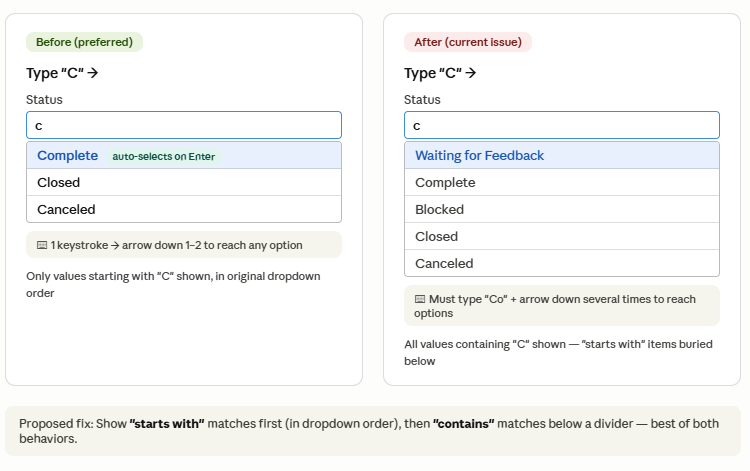
The recent change to Grid View dropdown filtering now shows all values containing a typed letter, rather than prioritizing values that start with that letter. This breaks a fast keyboard-driven data entry workflow many users rely on.
Requested behavior:
- Show "starts with" matches first (in original dropdown order)
- Then show remaining "contains" matches below
- Keep auto-select behavior when only one "starts with" match exists
Why it matters:
- Before: type "C" → Complete auto-selects (1 keystroke)
- Now: type "C" → must type "Co" then arrow down multiple times
- Heavy dropdown users (sprint tracking, status logging) repeat this dozens of times daily
- Directly impacts users with repetitive strain / tendinitis — more keystrokes = real pain
Use case: Status columns with values like: Not Started, In Progress, Waiting for Feedback, Complete, On Hold, UAT, Follow up, Blocked, Closed, Canceled
I reported this to Smartsheet Support but I was told this is now new expected behavior. I'd like the old function back or at least sort with Start with then Match on dropdown value.
 Chizu Hieida
Welcome to the Project Management Office (PMO) Community!
This is a space for Smartsheet users that work in Project Management Office (PMO) functions to connect, share ideas, challenges, best practices and how you are using Smartsheet to transform your specific use case.
Our Smartsheet team will be sharing helpful resources, upcoming industry events, discussion questions, and more. You’ll see us jumping in from time to time, but first and foremost, this space is yours to connect and collaborate with peers.

We’ve created a unique Project Management Office (PMO) badge just for this community to showcase on your profile and use to connect with others. Introduce yourself and start engaging with your peers and the badge will be automatically added to your profile.
Need a little inspiration? Tell us:
- How long have you been using Smartsheet?
- How are you using Smartsheet today or planning to in the future?
- What would you like to learn from your peers using Smartsheet for Project Management Office (PMO)?
 Rebeca S.
Have Board view work in Reports
Board view is amazing - I love being able to control what columns my users see. Please allow this to work in Reports!
MockerTwin22