Connect with peers, share your expertise, and inspire what’s next in Smartsheet — from proven practices to practical how-to insights from fellow users and product experts.
Sign in to see the current vote count, add your own vote, or leave a comment.
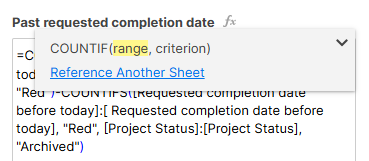
The formula window at times blocks the cells users want to quickly reference in their formula. Can this window be adjustable or can a formula box be added to the UI?
Hello awesome people,
Especially when working with large, complicated formulas, the color coding of the variables and corresponding cells is really helpful! (And shoutout also for making it so that when I paste formulas into onenote to work with them, the color coding remains. Great feature.)
Unfortunately, the formula editor window often covers up all the cells that it is highlighting. It would be amazing if you could move the window around manually, or if there was some means to ensure the window did not cover up cells it is highlighting.
Sorry if this is a repeat idea. I tried searching for it and came up short.
Thanks,
Don
I could not find this request anywhere but I'd be very surprised if it's not.
When you edit a long formula in Smartsheet, the formula pop-up almost always is in the way of being able to see the cells in the row that it is referencing. Please make it possible to move the white window, Possibly using the right mouse button or by giving us a move window shape
Make something like this appear if you hover over the edge of the window maybe?
I'm editing formulas in a Sheet Summary. However, I'm prevented from seeing the formula by an annoying "helpful" popup that obscures my view. Could an "x" button be provided to remove the popup?
Sign in to comment or add your vote.