Best Of
Re: Change Formatting in Reports
Completely agree! Often the users who view reports need/want a different format from the folks managing the information in the sheets day to day. This would be a great feature.
 Jared G
'Helper' Column Management via New Column Type (or Side Panel?)
Many of us, if not most, use one or more helper columns to achieve the Sheet functions that we need. Good practice is to hide the helper columns (when possible) so that the sheet user isn't bombarded with noise.
Unfortunately, hidden columns still appear while in Card View. My solution for this is to move all of the helper columns to the end of the sheet, add a new column to the right of the last column of relevance to the sheet user and populate it with "🛑 End of Card 🛑" or something similar. When scrolling down the card, the red stop sign emojis stand out and the user knows they don't need to scroll through the remaining n fields.
A new Column Type named "Helper" could solve this. It would be even better to build this in conjunction with a menu option to specifically Hide/Unhide Helper Columns.
Hidden columns of the Helper type would:
- not appear in Card View
- not appear in published versions of the sheet
- not appear in the column selection dropdowns for report and sheet filters OR,
- ...simply shove them to the bottom of these lists and denote their helper status somehow (Italics, perhaps?)
Hopefully, the community can help me fine-tune this feature request.
-Kevin
P.S. I thought of the "column type" solution while typing up another solution idea for this problem. If the above doesn't gain any traction, maybe this will:
. . . [H]ow about adding a new panel to the right-side toolbar -- similar in function to the Sheet Summary panel -- to contain the helper formulas. Each row could look at the specific value for the helper formulas for that row.
Helper columns could be "moved" to this panel via a toggle in the context menu when right-clicking on the column header, similar to the Lock/Unlock Column toggle. Perhaps this option only appears if the column has a column formula.
 Kevin M.
FAQs and Guidelines for posting Product Feedback Ideas
Hi Community,
Welcome to the Product Feedback and Ideas space where you can help shape the future of Smartsheet! We really appreciate your feedback and will take all posts into consideration. Our product team will review top ideas and requests monthly and we'll share updates as soon as we get them.
Remember: if you have a question about the product or are experiencing issues, post your question in a Support topic or check our Status page.
By submitting an idea, you agree that Smartsheet will have a perpetual right to use and incorporate any feedback or suggestions without any obligation of compensation.
Here are some FAQs and guidelines for how to submit your ideas in the most effective way:
Guidelines for submitting your ideas
💡 New idea: before you post, make sure that the idea has not already been created.
💡One idea per post: each idea will need to be an individual request so we can be clear about the status. Posts with multiple ideas will either be paired down by the Moderation team or removed. Instead, please create multiple posts: one for each idea.
💡Clear title: make sure the title is specific to your one idea for that post.
💡 Tag your post: apply a relevant tag to help classify your feedback.
💡 Add details about your use case: add as many details as possible, including images and stories. Here are some questions you can answer as you craft your post:
- What problem are you trying to solve?
- What is your use case? (Describe a scenario or story.)
- What is your ideal solution?
NOTE: Vague ideas or posts with "thin content" will be changed to discussions and removed from the ideation space.
Commenting on current ideas
We would love to hear your additional feedback on a current post! Please add your own story and context to help give us a better picture of your specific use case.
- Why do you agree?
- Why do you disagree?
- Do you have a different solution?
Frequently asked questions
1. Do I need to sign in to participate?
Anyone can view ideas, but if you want to post, vote for, or comment on ideas, you must be signed in to the Smartsheet Community.
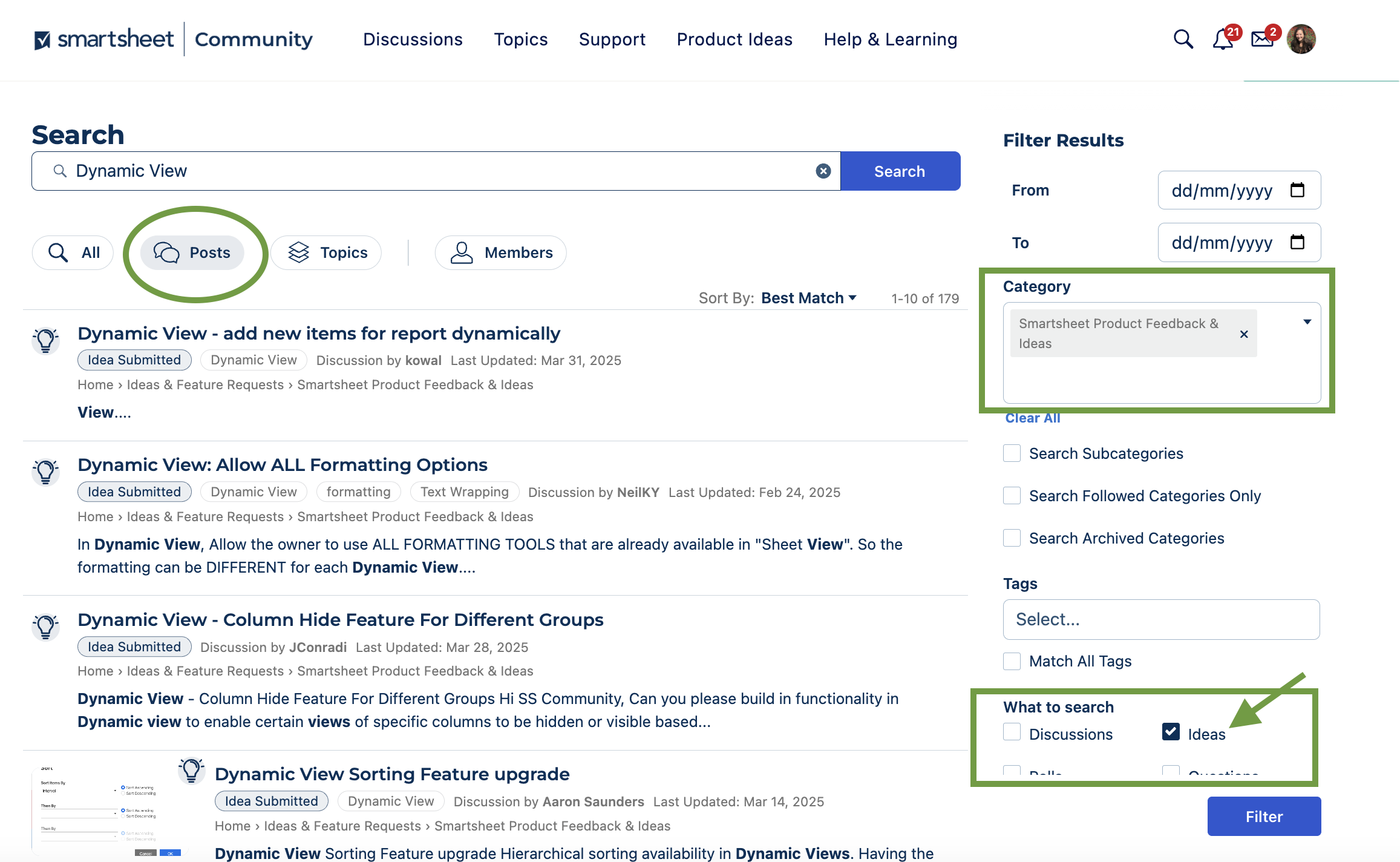
2 . How do I search existing Ideas?
Search for your keyword or phrase.
Click Posts from the top toolbar then filter by the Smartsheet Product Feedback & Ideas Category on the right hand menu.
You can also filter by Idea type of posts to see all the posts gathering votes.
3. Can I get notifications from ideas I've voted on?
Yes! Once you have voted on an idea you will receive email notifications if the status is updated.
NOTE: You can change your email notification preferences from your Community Profile.
4. How do I post an Idea?
🔎 Before you post something new, always search to see if your idea already exists.
- If a similar idea exists, add your vote to the idea to show your support.
- If it doesn’t exist yet, click New Idea. If you are on the Community home page, click New Post then New Idea.
5. Where can I see all of my past Ideas?
You can check out all of your past posts in your Community Profile (in the top right corner).
- Under Discussions you'll see all your top-level discussions, questions, and idea posts.
- Under Comments you'll see any of your comments in the Community, including comments on idea posts.
6. What are the Idea status options and what do they mean?
- Idea Submitted - The default status when any new idea has been submitted.
- Available Now! - This feature is available!
- Coming Soon! - Stay tuned; this feature should be released within the next few months.
- On Roadmap - While we can't yet provide a timeframe for release, this is in our future plans.
- On Wishlist - This idea is not part of our current plan, but we love it and will look into it further.
- On Radar - This idea is not part of our current plan, but we appreciate you sharing it. We'll keep an eye out for more context, feedback, and upvotes.
As a reminder, all members are expected to follow the Community Guidelines when posting in the Community.
We look forward to hearing all of your great ideas!
 Genevieve P.
Re: Increase sheet row and column limits
Hello,
It would be great to increase sheet and reports capacity.
20.000 rows or 500.000 cells it's not enough. I think it should be like 100.000 rows per sheet. I would like to use connector/bridge or data shuttle for larger data sets and not to think how to split sheets into many different archive files. It would be a great game changer for every advanced Smartsheet user.
Michal Luty
Transfer Calendar App Assets
The calendar app does not allow Sys Admins to transfer calendars to other users. When the owner of a calendar is terminated, there is no way to gain control of that asset, and it has to be rebuilt. Admins should be able to transfer calendars to any other user who is enabled for that premium app.
 Scott Peters
Meet Matt Johnson, our October Member Spotlight! 🎉
Say hey, hey, hey, to our October Member Spotlight and Community Champion, @Matt Johnson!

Matt lives in a suburb of Nashville and works as a Senior Project Manager at Sevan Multi-Site Solutions, a Smartsheet Aligned Partner. He has been with the company for over six years and is a key contributor in program management solutions in the construction, design and data analytics space for global clients.
When he was first introduced to Smartsheet, he was on an account that had "smart people doing great things," but those things were also siloed and not scalable. He was soon tasked with implementing Smartsheet and training his team on it. He found the set up process to be smooth, with Smartsheet being flexible enough to change with evolving processes.
"Adoption was more challenging," he says, "but in the end, we got there. Other accounts soon wanted to replicate what we had done, followed by our clients."
These days, Matt says he's found reports to be a favorite feature among a variety of users he's worked with. "The ability to expand and collapse different sets of data has proven very useful across the board," he explains. "Listing them on a homepage-type dashboard is a great way to get people to use dashboards overall."

Along with other fellow Community Champions, Matt just attended our customer conference ENGAGE last month. He had a blast meeting other Community members in person and having face-to-face interactions - including with Smartsheet CEO Mark Mader (see photo above). "And of course, I enjoyed learning about Smartsheet's Generative AI efforts," he adds. "It's fun to see the future and know it's not that far away."
What's Matt's advice for members looking to become a future Community Champion? Keep it concise when it comes to support content.
"Be as clear as possible in both your questions and your answers. Also, if the conversation is becoming more than one or two exchanges, check out the other person's signature block and reach out to them offline for more detailed discussions. And then don't forget to recap it back on the forum thread to explain the outcome so others can learn as well."

When Matt isn't helping others on Community, he enjoys sports photography with a focus on mountain biking and BMX ("anything where kids are learning and having fun").
Thank you Matt for all that you do!
---
Do you know someone in the Community who should be next month's Member Spotlight? Nominate them here. 🤩
 Alison C.
Re: Ready, set, share your solution! 🚀 Showcase your skills for a chance to win unique prizes.
A big thank you to everyone who shared their creativity and solutions with us. Keep an eye out for participant, winner, runner-up and published solution badges headed your way.
Congrats to our Community Created Template Showcase winners: @Michelle Choate 2, Nicholas Miron, and @Lauren Dominique, as well as our runner-ups who will also have their solution featured in the template gallery: @TWO21 , @DesireeJones , and @MCorbin.
 Arsineh
Re: Update Request Customization - descriptions and headers like a Form
I want to send an update form that is customised like a standard row creation form. There are enough discussion topics with people asking for this or similar functionality. Please bump this up the to do list.
At the moment you only get the field description, no help text.
It is impossible to create multiline text entry boxes.
Make fields clearly read only when they are locked.
Robin Herrick
Re: Our first ENGAGE challenge is here - Smartsheet Travel Diaries 🗺️ + Bonus Giveaway
I am an Analyst, and multiple screens is essential. And it is not uncommon that they are all focused on something related to Smartsheet! That is being productive!!!!

 Sherry Fox