Best Of
Re: July Question of the Month - Join the conversation and receive a badge
I wanted to get certified this year and I did it! Feels great.
 Oscar Gonzalez_1
Re: July Question of the Month - Join the conversation and receive a badge
My personal goal this year is to become a Smartsheet Ambassador, i just recently received Leader ranking which i was not expecting. This just gets me closer to my goal!! I'm super excited — this year i have been really focused around career growth, which will hopefully lead me into my big personal goal of buying a house so my kiddos can have a backyard to play in! Keep your fingers crossed for me!🤞
 Cayla Davis
Community Corner Newsletter [July 2025]
Happy July, Community!
I hope you're all having a great start to summer (or winter, or rainy season like me). Building on last month's fantastic edition from @Genevieve P. (and those fun facts about Scotland!). I'm ready to bring you a fresh batch of updates, a couple of new videos, and a reminder that Overachiever applications are open for just two more days! I'm also sharing a little more about myself at the end of this edition. 😄 Read on to catch all the latest news.
Community highlights
Help us welcome some of our newest Member introductions in Show & Tell or look through the Trending section for more ways to connect.
Say hello to these Community Members 👋🏻
You can find more new members and say hello here.
---
Ideas & feature requests (recently reviewed and updated by our Product Team)!
What’s it going to be? Head to the Smartsheet Product and Ideas Topic to share and vote on ideas.
- Improved User Auto-Provisioning - Available Now!
- Enable AI Tools in Dashboards - Add AI generated charts/data to existing or new dashboards - Available Now!
---
Community updates
In Case You Missed It (ICYMI)

Work With Flow - A Space Story
Watch their story and share yours!

July Question of the Month

Two days left to apply to Overachievers!
Learn about the program & apply here

SmartU New Offerings
Learn about Smartsheet Builder Path & more!

NEW - Smartsheet Regions Australia, now available!
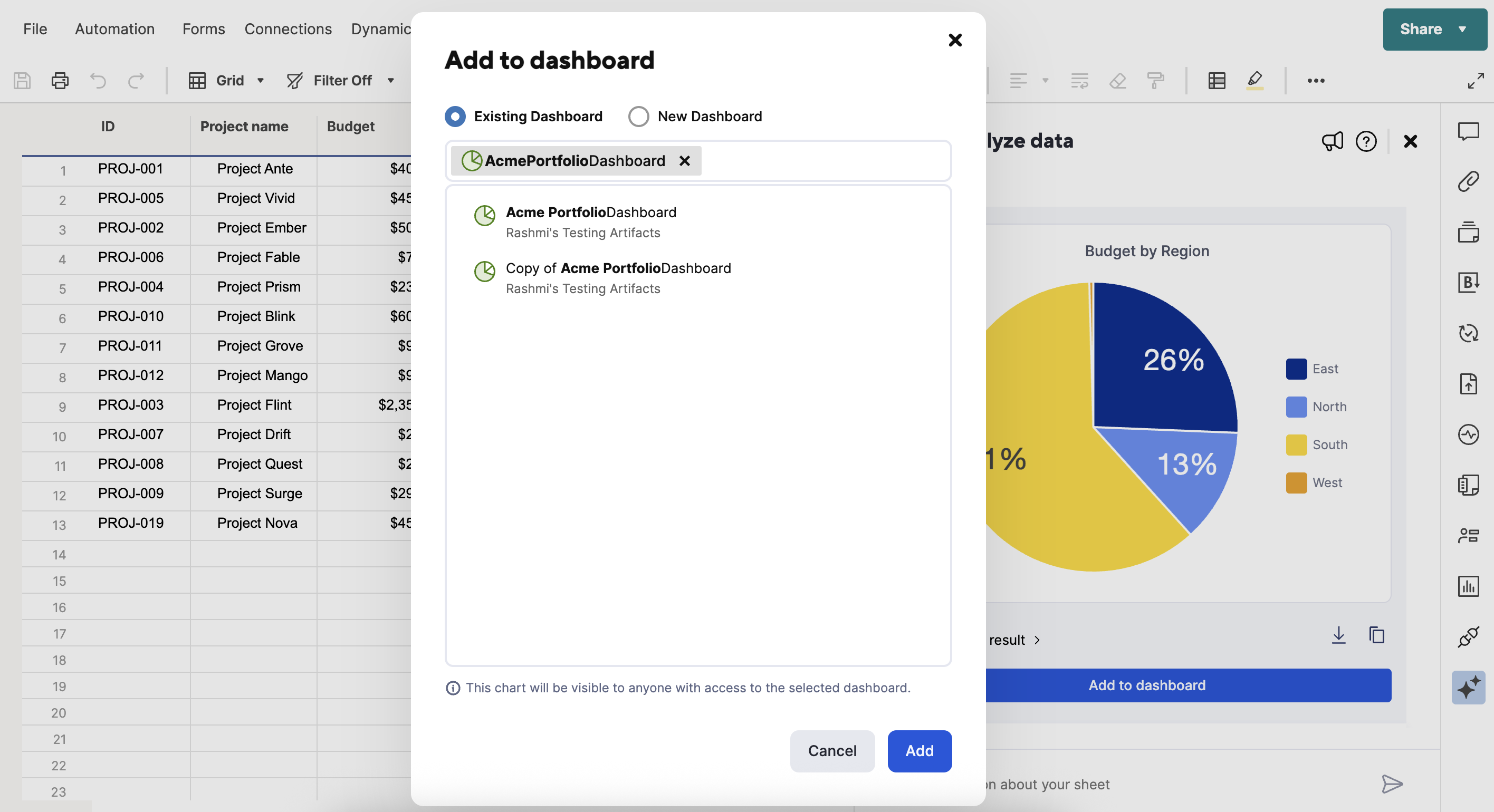
Add analyze data charts to dashboards
Learn all about this exciting update here

Smartstories - Describe Smartsheet to the newbies!
See how fellow Community members responded
---
Pass the mic 🎤 Community Champions
Community Champions are members who demonstrate product expertise and generosity in sharing best practices and support with others on the platform.

"I've learned so much from this community, especially new and creative ways to use formulas that I hadn’t considered before. The diversity of thought here constantly challenges and expands how I approach problem-solving in Smartsheet."
- @AKnight , Business Operations Specialist at LEVATA Human Performance and our June 2025 Member Spotlight
Do you know someone in the Community who should be next month's Member Spotlight? Nominate them here.
---
Member Appreciation
See Activity feed for more
This month's leaderboard
---
Overachiever's Motivation Mix
The Smartsheet Overachievers are here to give you the songs that will keep you going and keep you achieving! Here’s what’s on the playlist right now.
BTS - ON
“If you didn't know I'm a BTS fan, now you do! This song is essentially a motivational anthem, with powerful lyrics, heavy, percussive sound and huge energy. I specifically picked this music video to highlight the amazing choreography that's so central to their work. You get to see BTS shining alongside the Blue Devils marching band, the dancers from THE LAB, and dancer-choreographer Sienna Lalau.
P.S. If the location looks familiar, that's the Sepulveda Dam in Los Angeles, a popular filming spot! (I have more fun facts, but this would be too long 😆).”
- @Rebeca S., Community Engagement Specialist at Smartsheet + part of the Overachievers team
---
More about Rebeca:

Back in January, some of you asked me to check in on your goals later in the year, and that's exactly what we're doing with July's question of the month!
I figured, if I'm asking you, I should answer myself, right? If you were at the Leaders or Ambassadors virtual meetups, you already know this, but I've recently started doing yoga! For a long time, it was one of those "it would be nice" goals I just kept putting off.
As we approached the midpoint of 2025, I looked at my goals list, and there it was: still postponed for that "right moment" that never seemed to come. So, I decided to finally find a nice studio and book a class without overthinking it. It ended up being one of those things where you start and immediately wonder, "Why didn't I do this sooner?!"
Turns out, even though it's challenging, it's also fun, relaxing, and gives me the energy to start my week right!
So, how are your goals going? I'd love to read your answers in the question of the month! Share what you're working on, and I'll be cheering on you!
---
Give us your feedback
Have ideas for the next Community Corner? Leave your thoughts in the comments!
Note: Unfollow this Topic if you'd no longer like to receive alerts. We'll miss you!
 Rebeca S.
Re: Can you uses forms to populate fields in existing rows instead of creating an entirely new row?
Hi,
I hope you're well and safe!
It's possible, but I'd recommend this instead.
1️⃣. Start with the form
2️⃣. Continue with either an Update Request or use the Premium App, Dynamic View
Make sense?
Would that work/help?
I hope that helps!
Be safe, and have a fantastic day!
Best,
Andrée Starå | Smartsheet Expert Consultant & Partner / CEO @ WORK BOLD
✅ Did I help answer your question/solve the problem? Please support with💡 ⬆️ ❤️, and/or ✅ Answer. This will make it easier for others to find a solution or help answer! I appreciate it, thank you! 🙏
 Andrée Starå
Re: Automate a sql query of public information to merge with Smartsheet
You're not alone—I also started from scratch with no prior experience using the PostgreSQL connector in Power Automate or accessing the AACT database. But I was able to get everything working to automatically retrieve clinical trial data and output it to Excel, which I can later merge into Smartsheet via Data Shuttle or API.
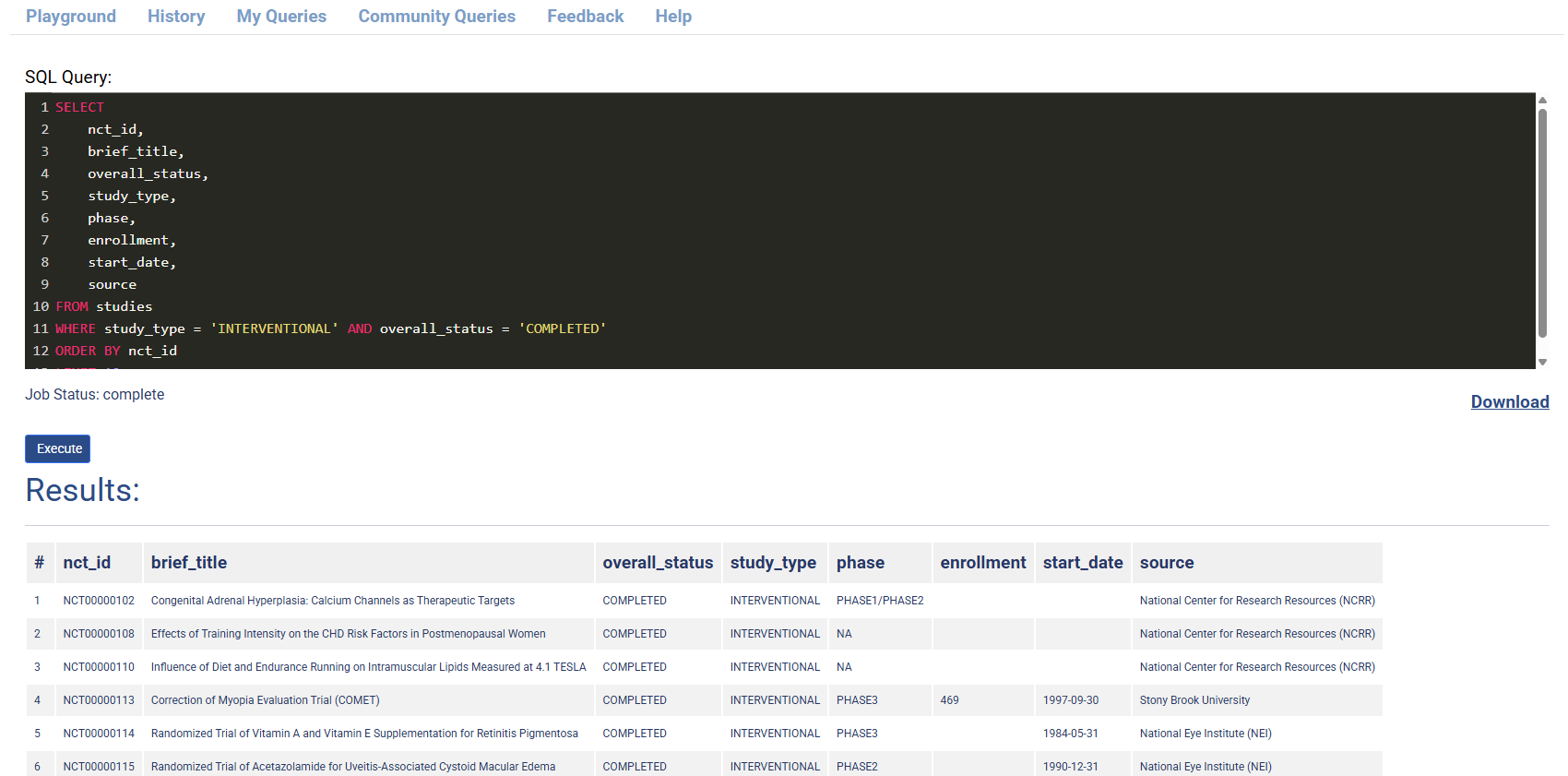
The image below is the SQL Query in the Playground, which I automated using Power Automate.
What I Did — Step-by-Step:
1. Scheduled Flow (Testing at 10:00, 11:00 AM JST)
I used the "Recurrence" trigger in Power Automate to test the flow daily at 10:00 and 11:00 AM Japan Standard Time.
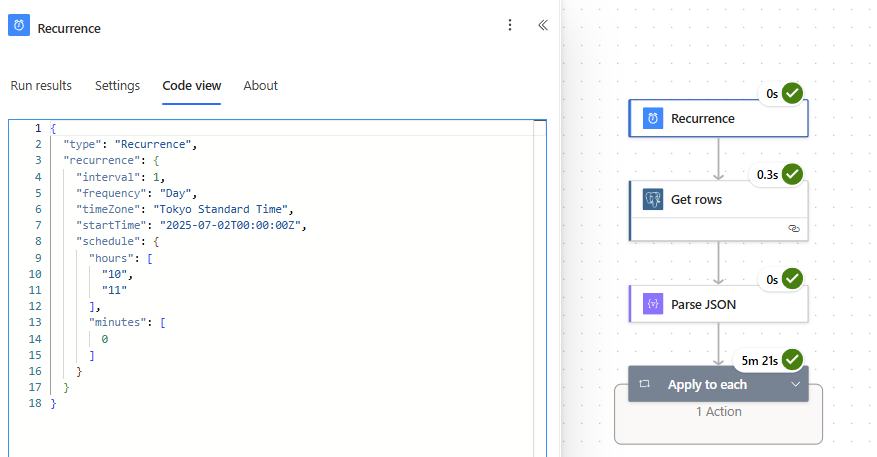
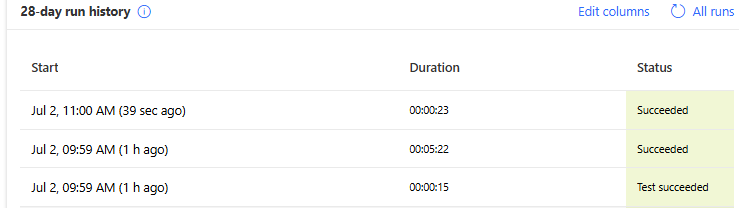
The image shows that the 10:00 AM and 11:00 AM schedule triggers are working, as expected.
2. Query AACT Public Database (PostgreSQL)
I used Power Automate’s PostgreSQL "Get rows" action.
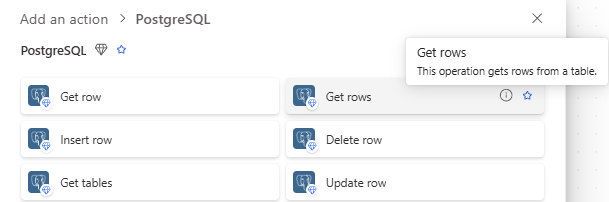
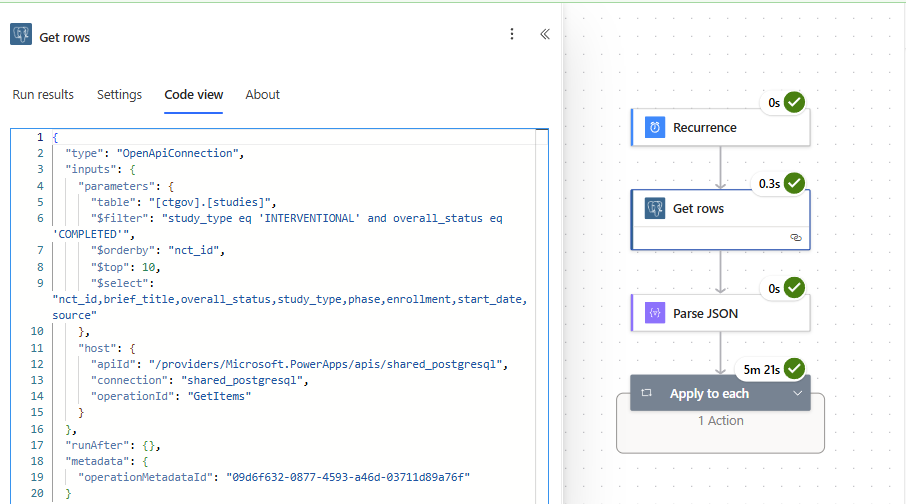
- Connection setup:
- Server:
aact-db.ctti-clinicaltrials.org - Database:
aact - Authentication: Basic (username & password from your AACT account)
- Server:
- Table name:
studies - Select Query: nct_id, brief_title, overall_status, study_type, phase, enrollment, start_date, source
- Filter Query: study_type eq 'INTERVENTIONAL' and overall_status eq 'COMPLETED'
- Order By:
nct_id - Top Count:
10
3. Parse the Results (Parse JSON)
Once the data is pulled, I used the "Parse JSON" action. I used a schema that matches the study fields I care about (e.g., nct_id, brief_title, start_date, etc.).
As for the schema, you can use the example output from the PostgreSQL "Get rows" action.to create one.
{

  "type": "ParseJson",

  "inputs": {

    "content": "@body('Get_rows')",

    "schema": {

      "type": "object",

      "properties": {

        "value": {

          "type": "array",

          "items": {

            "type": "object",

            "properties": {

              "nct_id": {

                "type": "string"

              },

              "brief_title": {

                "type": "string"

              },

              "official_title": {

                "type": "string"

              },

              "overall_status": {

                "type": "string"

              },

              "phase": {

                "type": "string"

              },

              "study_type": {

                "type": "string"

              },

              "enrollment": {

                "type": "integer"

              },

              "enrollment_type": {

                "type": "string"

              },

              "source": {

                "type": "string"

              },

              "start_date": {

                "type": "string"

              },

              "completion_date": {

                "type": "string"

              },

              "completion_date_type": {

                "type": "string"

              },

              "primary_completion_date": {

                "type": "string"

              },

              "primary_completion_date_type": {

                "type": "string"

              },

              "verification_date": {

                "type": "string"

              }

            }

          }

        }

      }

    }

  },

  "runAfter": {

    "Get_rows": [

      "Succeeded"

    ]

  },

  "metadata": {

    "operationMetadataId": "eb875e21-1ed1-4ac1-92ed-2abfada6a319"

  }

}
4. Write Results to Excel
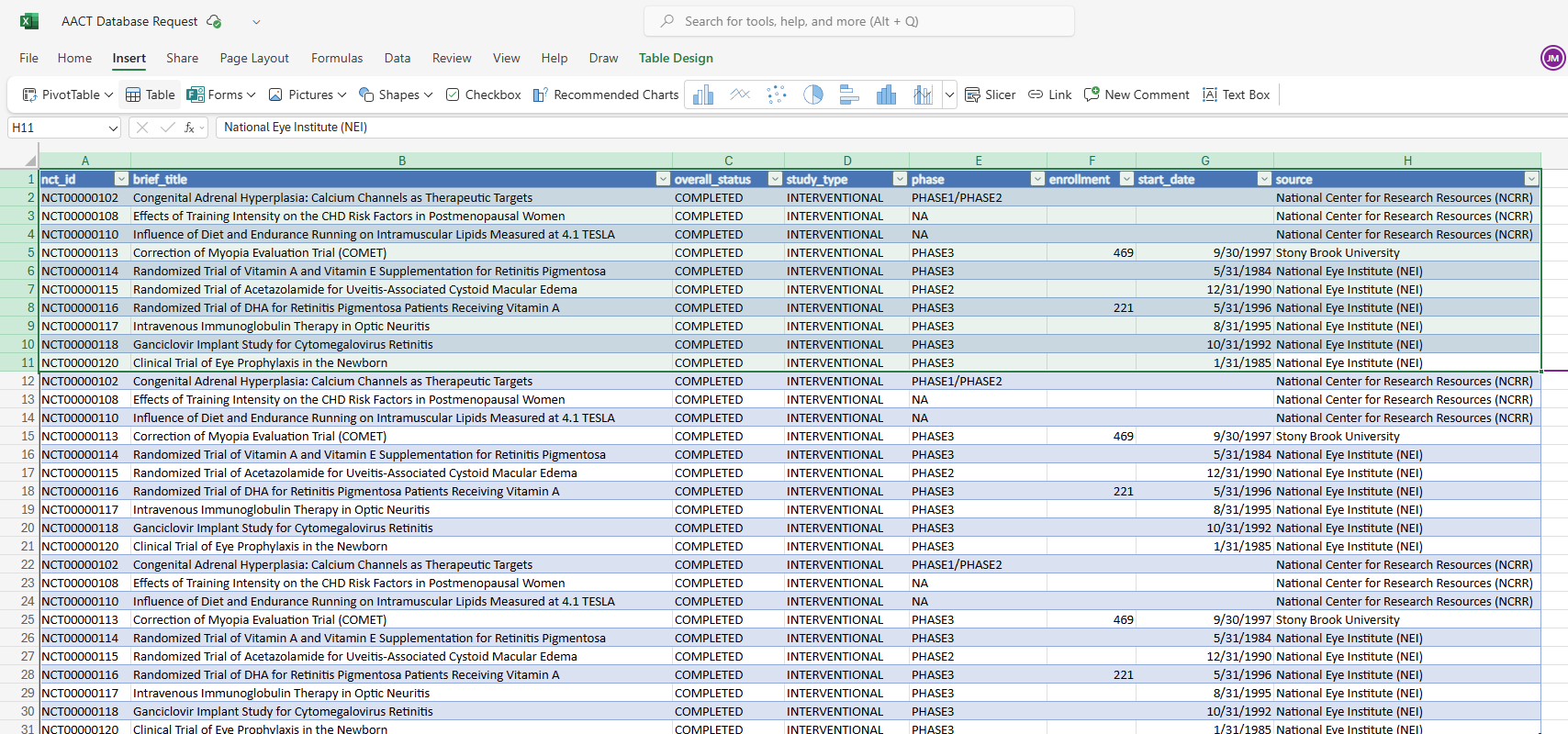
Next, I used "Add a row into a table" (Excel Online Business connector) to output the results to a structured Excel file hosted in OneDrive. I set up my Excel table with headers, as shown in the image below.
Ensure that you create a table by selecting the cells and then using the menu, Insert > Table. I created an original Excel file by downloading the results for the ACCT playground. (In the image, the first 10 rows are from the download, the next 10 are from the manual test, and the last 10 are from the schedule trigger, 10:00 AM JST)
Each row from the database is added to Excel through a loop (Apply to each).
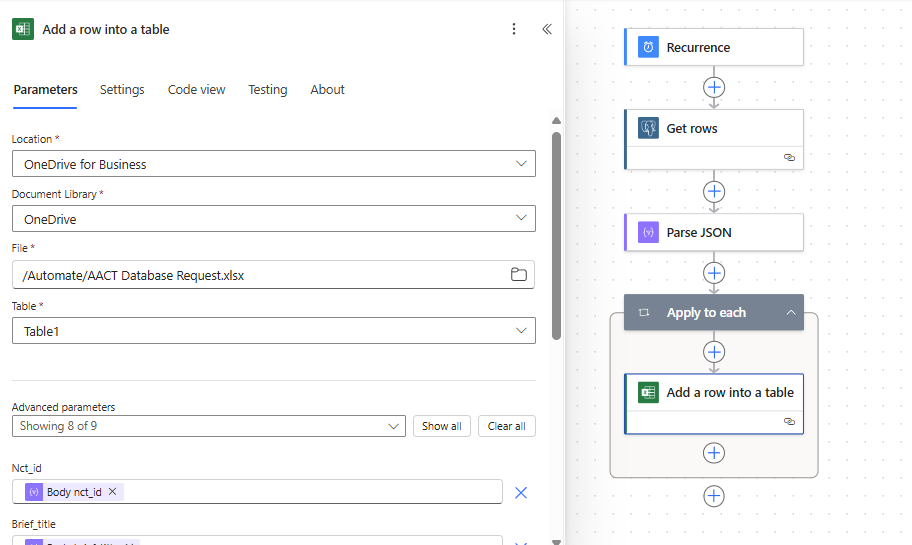
{
  "type": "Foreach",

  "foreach": "@body('Parse_JSON')?['value']",

  "actions": {
    "Add_a_row_into_a_table": {

      "type": "OpenApiConnection",

      "inputs": {

        "parameters": {

          "source": "me",

          "drive": "b!A8yUIuweNEuY_8yivd1DDiUQpLg7Xq1EkEpaLAK0sMPaLbPhwt5cQKVGPKFlXBsQ",

          "file": "01GN4LQ2AK5M5UAES3SFELAMS4X4EVX3OA",

          "table": "{D043FC29-9579-477D-AA3F-F3D99095773A}",
          "item/nct_id": "@items('Apply_to_each')?['nct_id']",

          "item/brief_title": "@items('Apply_to_each')?['brief_title']",

          "item/overall_status": "@items('Apply_to_each')?['overall_status']",

          "item/study_type": "@items('Apply_to_each')?['study_type']",

          "item/phase": "@items('Apply_to_each')?['phase']",

          "item/enrollment": "@items('Apply_to_each')?['enrollment']",

          "item/start_date": "@items('Apply_to_each')?['start_date']",

          "item/source": "@items('Apply_to_each')?['source']"

        },

        "host": {

          "apiId": "/providers/Microsoft.PowerApps/apis/shared_excelonlinebusiness",

          "connection": "shared_excelonlinebusiness",

          "operationId": "AddRowV2"

        }

      },

      "metadata": {

        "01GN4LQ2DG37SUQ7S7T5F3KRRNR5FQMJKZ": "/Automate/AACT Database Query.xlsx",

        "operationMetadataId": "caf7705c-f5bb-434d-9b64-319dac8ff4b2",

        "tableId": "{D043FC29-9579-477D-AA3F-F3D99095773A}",

        "01GN4LQ2AK5M5UAES3SFELAMS4X4EVX3OA": "/Automate/AACT Database Request.xlsx"

      }

    }

  },

  "runAfter": {

    "Parse_JSON": [

      "Succeeded"

    ]

  },

  "metadata": {

    "operationMetadataId": "acd8880b-e2f2-4010-a5f6-0043ed557031"

  }

}
This approach:
- Keeps your trial data fresh and centralized
- Can be easily scheduled to run at any frequency (e.g., daily, weekly, etc.).
- Provides clean, structured data you can connect to Smartsheet via Data Shuttle.
- Can also be adapted to push directly to Smartsheet via API if needed
Let me know if you'd like me to share a sample flow export or JSON schema—I’d be happy to help others replicate this!

Re: July Question of the Month - Join the conversation and receive a badge
To finish building & move to my house in Lanckorona ETA September 2025

 kowal
kowal
Re: July Question of the Month - Join the conversation and receive a badge
One of my ongoing goals is to complete my PMP. I've been having a hard time finding time to lock in and study.
 Isis T
Re: Queries about new payment methods
@Naeem Ejaz we wouldn't be able to do it with our AD integration. I was just asking the general question and to point out yet another "flaw" to the USM.

Re: Looking to summarize data from multiple rows to multiple columns so I can generate a document.
How about something like this:
Step 1
Use a JOIN function to get all of the data you need per infraction into one cell, something like:
=JOIN(Date@row:[6 Month drop off date]@row, " | ")

This can be one hidden column in your existing sheet.
Step 2
Transpose each row into a column.
Use an INDEX function to return the value from the new column from row 1 in column 1, row 2 in column 2, row 3 in column 3….
=INDEX(Combo:Combo, 1)
=INDEX(Combo:Combo, 2)
=INDEX(Combo:Combo, 3)
You would do this in your new summary sheet and replace the column name with a cross sheet reference, so the formula would look more like this (depending on the name you use for your cross sheet reference).
=INDEX({Combo}, 1)
=INDEX({Combo}, 2)
=INDEX({Combo}, 3)
The summary sheet would look like this:

Would that do the trick? Or do we also need to look at the employee name?
If so, you can add the name to the first list:

And to the second summary. Then include a COLLECT function in the INDEX to include only the rows where the names match. (The IFERROR is there to return nothing if there is no match, rather than an error message).
=IFERROR(INDEX(COLLECT(Combo:Combo, [Employee Full Name]:[Employee Full Name], Name@row), 1), "")
Change the 1 to a 2, 3, 4 etc. for each column. The summary table would look like this:

Hope that helps.
 KPH
KPH
Re: Importing Data into existing sheet
@Tommi @Danielle Wilson @AnneSh We have a new option available now using a handy browser extension to solve this problem if you don't have access to DataShuttle or want to do an import without needing to create a DataShuttle configuration:
 Darren Mullen