Best Of
Re: Chart Labels: drag labels overlap & stacked column labels
I'm having this problem too and would love a solution to be implemented with the dashboard revisions this year.
 LizTo
LizTo
Re: Option to Not Include Sheet Link on Notifications
The one and only roadblock holding us back from going live with our sheet is the 'Go to Sheet' link on the automated notifications and updates sent by Smartsheet. We need to send approval requests, comments and attachments to outside parties without giving them access to the sheet itself.
BIG up vote for removing this feature!
 seana
seana
Allow folders to be added as pages in WorkApps
It would be helpful when we want to share stuff like archives of meeting agendas, instead of having to share each individual sheet.
 lindsayjones
Re: October Question of the Month 💭 Join the conversation and receive a badge
Leaving the comfort of my career in secondary education as a teacher and diving into an entirely new career was a terrifying leap. The thought of abandoning the familiar routine and stepping into the unknown filled me with anxiety. But, as I took the plunge, I discovered personal growth, adaptability, and newfound strengths I never knew I possessed. Not to mention, the exposure to Smartsheet! It turned out to be one of the best decisions I ever made, leading me to a more fulfilling and exciting path in life, reminding me that sometimes the most frightening steps can be the most transformative and rewarding.
 Stacy Gumula
New Badge Idea - Project Management Certification
Having reviews the badges area of the Community, there is only a badge celebrating the Core Certification exam. Please could we have badges to display for passing the Solutions Center Exam and the Project Management Exam too?
 Debbie Sawyer
Re: Recover Deleted Rows
Smartsheet STILL does not have the ability to FULLY recover deleted rows. Sure, they may be able to send you an Excel style backup/snapshot, but you lose your: Cell history, conversation thread, attachment links, sheet links, formatting, etc etc etc. You 'might' get the raw cell contents back, but telling someone that a .csv is their only backup solution for their .xlsm is laughable.
The .csv is better than nothing, for sure, but after +7 years we really had hoped that a better solution - or heck even a genuine step in the direction of better data security - would be available. But... whatever.
As it stands, 7+ years on and fully, completely, and unequivocally aware, Smartsheet still has the behavior that if someone can edit a single cell within a row of a sheet - they can delete the entire row! And, they can delete it without even getting a pop-up message to ask them if they're sure they want to delete it! (which is funny, because if they try to unlock it they get a pop-up - but if they try to delete it, they succeed without even being questioned)
And, as if it being absurdly easy to lose data wasn’t enough of a kick in the pants, they also still don’t have a true backup option available. Meaning, if you lose a sheet/row/etc – all they can provide you with is a flat excel sheet with a pile of unlinked attachments. All cell history, formatting, links, etc are gone gone gone.
Feel free to review the following community posts, and then decide if you'd like to open an enhancement request on this 7+ year old issue.
Smartsheet: PLEASE do the following:
1. IMMEDIATELY (stop-gap) Implement a pop-up message whenever someone tries to delete a row. (this is already done for the 'unlock row' feature, and should be fast and easy enough to implement for 'delete row')
-zero impact on existing user rights
AND
2a. (solution) Implement a change to the software that will allow sheet owners to prohibit deleting any row that contains a locked cell/column.
OR
2b. (solution) Implement a new user level that is "Editor - safe" where the user has all the rights of an Editor but where the 'delete row' functionality is greyed out. (There is only one permission difference between 'Editor - cannot share' and 'Editor - can share', so the precedent is there.)
Here is my ongoing (and incomplete) list of how many times Smartsheet has ignored this problem:
June 2015
https://community.smartsheet.com/discussion/rows-being-removed
August 2015
https://community.smartsheet.com/discussion/revert-old-version-sheet
August 2015
https://community.smartsheet.com/discussion/avoid-shared-person-delete-my-row
August 2015
https://community.smartsheet.com/discussion/conditional-lock
August 2015
https://community.smartsheet.com/discussion/find-deleated-items
October 2015
https://community.smartsheet.com/discussion/retrieve-deleted-data
February 2016
March 2016
https://community.smartsheet.com/discussion/prevent-deletion-rows-if-it-contains-locked-cells
May 2016
https://community.smartsheet.com/discussion/allowing-team-members-update-smartsheet
June 2016
https://community.smartsheet.com/discussion/prevent-deletion-rows-enhancement-request-again
June 2016
https://community.smartsheet.com/discussion/delete-rows-employee-avoide-tasks-completion
June 2016
https://community.smartsheet.com/discussion/deleted-rows-there-way-find-out-who
July 2016
https://community.smartsheet.com/discussion/historychange-deleted-rows
October 2016
https://community.smartsheet.com/discussion/block-rows-been-deleted-editor
February 2017
https://community.smartsheet.com/discussion/admin-deleted-bucket
March 2017
https://community.smartsheet.com/discussion/retrieving-lost-data
March 2017
https://community.smartsheet.com/discussion/viewing-deleting-rows
June 2017
https://community.smartsheet.com/discussion/web-form-submissions-disappearing
July 2017
https://community.smartsheet.com/discussion/retaining-deleted-info
September 2017
January 2018
https://community.smartsheet.com/discussion/adding-back-deleted-rows
March 2018
https://community.smartsheet.com/discussion/overwritten-sheet#comment-67946
June 2018
https://community.smartsheet.com/discussion/questions-new-user#comments
July 2018
https://community.smartsheet.com/discussion/retrieve-deleted-sheets
November 2018
https://community.smartsheet.com/discussion/activity-logrows-deleted#comment-124356
July 2019
https://community.smartsheet.com/discussion/52766/deleted-content-in-a-row
July 2019
September 2020
May 2022
https://community.smartsheet.com/discussion/90947/recover-deleted-rows
May 2022
June 2022
https://community.smartsheet.com/discussion/91973/how-can-i-track-deleted-rows
Yes, Smartsheet, you still need to fix this PROBLEM, BAD DESIGN, FLAW!
 Brad Jones
SharePoint embed in WorkApps
Please enable Smartsheet’s approved domain and add SharePoint to embed content for WorkApps.
AnneTyler
Re: Change Formatting in Reports
Completely agree! Often the users who view reports need/want a different format from the folks managing the information in the sheets day to day. This would be a great feature.
Jared G
'Helper' Column Management via New Column Type (or Side Panel?)
Many of us, if not most, use one or more helper columns to achieve the Sheet functions that we need. Good practice is to hide the helper columns (when possible) so that the sheet user isn't bombarded with noise.
Unfortunately, hidden columns still appear while in Card View. My solution for this is to move all of the helper columns to the end of the sheet, add a new column to the right of the last column of relevance to the sheet user and populate it with "🛑 End of Card 🛑" or something similar. When scrolling down the card, the red stop sign emojis stand out and the user knows they don't need to scroll through the remaining n fields.
A new Column Type named "Helper" could solve this. It would be even better to build this in conjunction with a menu option to specifically Hide/Unhide Helper Columns.
Hidden columns of the Helper type would:
- not appear in Card View
- not appear in published versions of the sheet
- not appear in the column selection dropdowns for report and sheet filters OR,
- ...simply shove them to the bottom of these lists and denote their helper status somehow (Italics, perhaps?)
Hopefully, the community can help me fine-tune this feature request.
-Kevin
P.S. I thought of the "column type" solution while typing up another solution idea for this problem. If the above doesn't gain any traction, maybe this will:
. . . [H]ow about adding a new panel to the right-side toolbar -- similar in function to the Sheet Summary panel -- to contain the helper formulas. Each row could look at the specific value for the helper formulas for that row.
Helper columns could be "moved" to this panel via a toggle in the context menu when right-clicking on the column header, similar to the Lock/Unlock Column toggle. Perhaps this option only appears if the column has a column formula.
 Kevin M.
FAQs and Guidelines for posting Product Feedback Ideas
Hi Community,
Welcome to the Product Feedback and Ideas space where you can help shape the future of Smartsheet! We really appreciate your feedback and will take all posts into consideration. Our product team will review top ideas and requests monthly and we'll share updates as soon as we get them.
Remember: if you have a question about the product or are experiencing issues, post your question in a Support topic or check our Status page.
By submitting an idea, you agree that Smartsheet will have a perpetual right to use and incorporate any feedback or suggestions without any obligation of compensation.
Here are some FAQs and guidelines for how to submit your ideas in the most effective way:
Guidelines for submitting your ideas
💡 New idea: before you post, make sure that the idea has not already been created.
💡One idea per post: each idea will need to be an individual request so we can be clear about the status. Posts with multiple ideas will either be paired down by the Moderation team or removed. Instead, please create multiple posts: one for each idea.
💡Clear title: make sure the title is specific to your one idea for that post.
💡 Tag your post: apply a relevant tag to help classify your feedback.
💡 Add details about your use case: add as many details as possible, including images and stories. Here are some questions you can answer as you craft your post:
- What problem are you trying to solve?
- What is your use case? (Describe a scenario or story.)
- What is your ideal solution?
NOTE: Vague ideas or posts with "thin content" will be changed to discussions and removed from the ideation space.
Commenting on current ideas
We would love to hear your additional feedback on a current post! Please add your own story and context to help give us a better picture of your specific use case.
- Why do you agree?
- Why do you disagree?
- Do you have a different solution?
Frequently asked questions
1. Do I need to sign in to participate?
Anyone can view ideas, but if you want to post, vote for, or comment on ideas, you must be signed in to the Smartsheet Community.
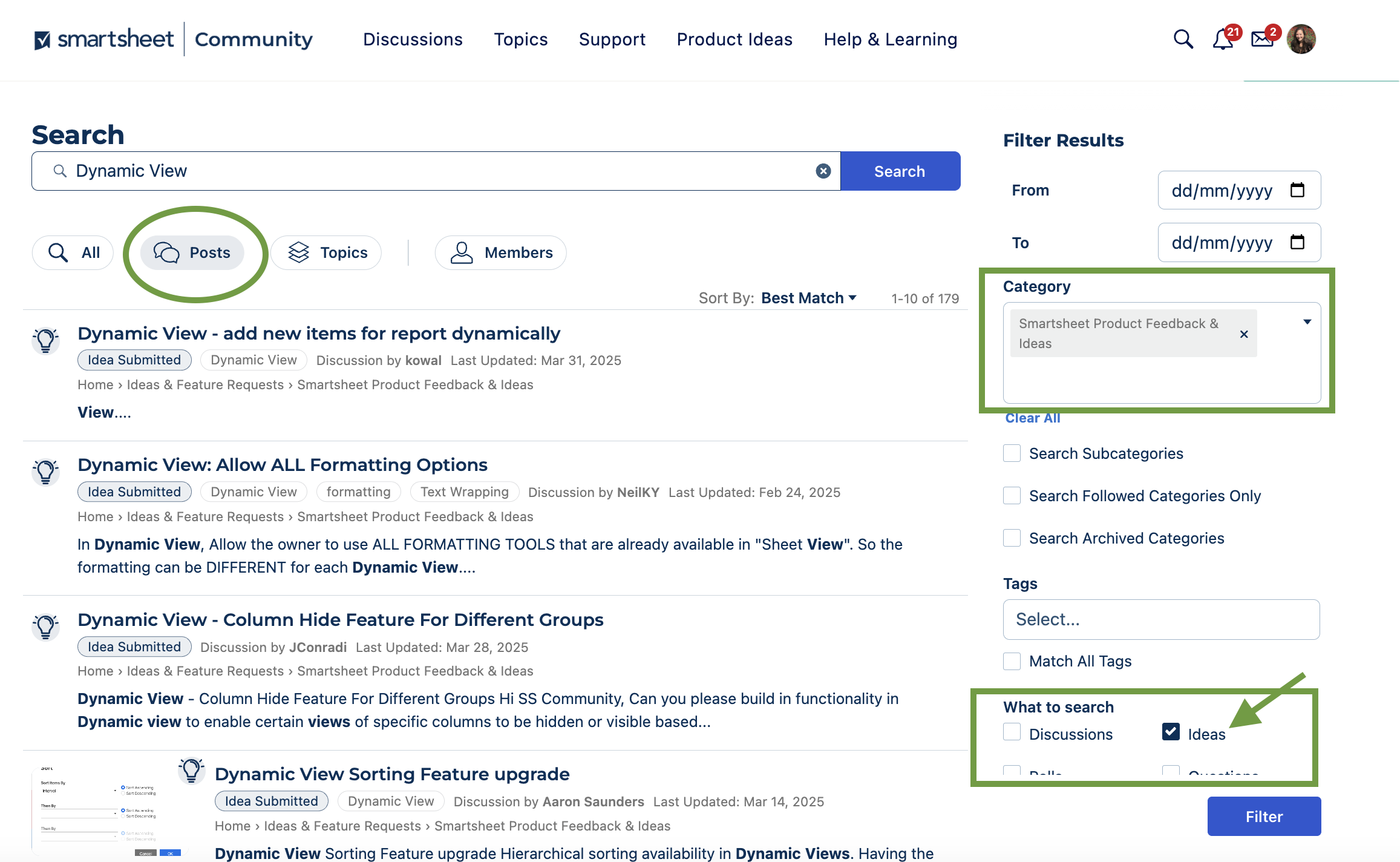
2 . How do I search existing Ideas?
Search for your keyword or phrase.
Click Posts from the top toolbar then filter by the Smartsheet Product Feedback & Ideas Category on the right hand menu.
You can also filter by Idea type of posts to see all the posts gathering votes.
3. Can I get notifications from ideas I've voted on?
Yes! Once you have voted on an idea you will receive email notifications if the status is updated.
NOTE: You can change your email notification preferences from your Community Profile.
4. How do I post an Idea?
🔎 Before you post something new, always search to see if your idea already exists.
- If a similar idea exists, add your vote to the idea to show your support.
- If it doesn’t exist yet, click New Idea. If you are on the Community home page, click New Post then New Idea.
5. Where can I see all of my past Ideas?
You can check out all of your past posts in your Community Profile (in the top right corner).
- Under Discussions you'll see all your top-level discussions, questions, and idea posts.
- Under Comments you'll see any of your comments in the Community, including comments on idea posts.
6. What are the Idea status options and what do they mean?
- Idea Submitted - The default status when any new idea has been submitted.
- Available Now! - This feature is available!
- Coming Soon! - Stay tuned; this feature should be released within the next few months.
- On Roadmap - While we can't yet provide a timeframe for release, this is in our future plans.
- On Wishlist - This idea is not part of our current plan, but we love it and will look into it further.
- On Radar - This idea is not part of our current plan, but we appreciate you sharing it. We'll keep an eye out for more context, feedback, and upvotes.
As a reminder, all members are expected to follow the Community Guidelines when posting in the Community.
We look forward to hearing all of your great ideas!
 Genevieve P.