Best Of
Community Corner Newsletter [May 2025]
Hello Community and happy May! How are we all feeling about finally seeing spring sprung? I am beyond thrilled. Living in New York after a little over 4 years now I truly understand how important it is to my mental health to see daylight early and nature back to life after very long and quiet winters. I feel both lucky and honored to deliver this month’s Community Corner Newsletter following in the footsteps of the great Alison Clancy’s April issue. Enjoy!
Community highlights
Help us welcome some of our newest Member introductions in Show & Tell or look through the Trending section for more ways to connect.
Say hello to these Community Members 👋🏻
You can find more new members and say hello here.
---
Ideas & feature requests (recently reviewed and updated by our Product Team)!
What’s it going to be? Head to the Smartsheet Product and Ideas Topic to share and vote on ideas.
Available in Table View:
- Collaborative and real-time editing
- Override Ability on Max # of Columns to be Deleted at One Time.
- Select Different Colors for Select and Multi-Select dropdown results
- Increase sheet row and column limits
- Unhide specific columns on a sheet
- Add 'sort order' to Filter Views
- Sort for Only You vs. Sort for All Viewers
- Allow pasting of more than 500 rows
- Sort column indicator
- Automatically Sort Rows in Sheets
Other Updates:
- Reactions to Comments - Coming Soon!
- Ability to save as new more than 100 files so the interactions remain - On Roadmap
- Workspace Restoration upon recovery from deleted folder - Available now!
- Enable check-box selection within Board card - Available now!
---
Community updates
In Case You Missed It (ICYMI)

Work With Flow
Watch the McLaren F1 story & share yours!

May Question of the Month

NEW Use Case Topics
Explore & start connecting with your peers

Upcoming in-person User Groups

Column Links Now Generally Available!

NEW Community Search Experience
Discover what you can do with the new search

NEW Community Navigation
A more intuitive way to explore the Community

SmartStories - Celebrating the 10th Anniversary
See how fellow Community members responded
---
Pass the mic 🎤 Community Champions
Community Champions are members who demonstrate product expertise and generosity in sharing best practices and support with others on the platform.

“Most of what I know about Smartsheet, I have learned from Community. When I hit a knowledge roadblock, I am almost always able to find either a solution or a new approach with a quick search.”
- @Carson Penticuff , Project Management Specialist at Toyotetsu North America and Community Champion (Learn more about Carson in his Member Spotlight here)
---
Member Appreciation
See Activity feed for more
This month's leaderboard
Member spotlight
Do you know someone in the Community who should be next month's Member Spotlight? Nominate them here.
---
Overachiever's Motivation Mix
The Smartsheet Overachievers are here to give you the songs that will keep you going and keep you achieving! Here’s what’s on the playlist right now.
DREAMS COME TRUE - 「何度でも」
“This song is about the importance of facing challenges, getting back up after every failure, and continuing to challenge oneself without giving up. In particular, the main lyric, "Even if I fail 10,000 times, the 10,001st time might bring a change" symbolizes the importance of persevering and continuing to make efforts without giving up. Their songs and her singing have lifted me from hard times when I felt defeated.”
- @Chizu Hieida , Technical Producer at Wizards of the Coast + current Overachiever (learn more about Chizu here)
---
More about Max:

Hi Smartsheet Community! I’m Max Griffith, a Sr. Web Producer here at Smartsheet. Many of you know me already, but for those who don’t—I’m a longtime marathon runner and recently hit a personal milestone. After nearly 10 years of training and six attempts at the marathon distance, I finally qualified for the Boston Marathon with a time of 2:50! It’s been a journey of resilience, and I’m grateful to share it with such a supportive community. To learn more about this journey check out my LinkedIn post here.
---
Give us your feedback
Have ideas for the next Community Corner? Leave your thoughts in the comments!
Note: Unfollow this Topic if you'd no longer like to receive alerts. We'll miss you!
 Maxwell G.
Re: May Question of the Month - Join the conversation and receive a badge
I help a large team ensure everything works just right, like when Bandit and Chilli get everyone out the door on time! We create effective plans, select the right tools, and ensure everyone knows their assigned tasks. It’s kind of like being the grown-up in a big game of pretend, where I help the team work together behind the scenes so the stores can do their part and everything goes smoothly, just like a good game of Keepy Uppy!

 sharsch
Re: Constraint Types in Gantt View
this is a major gap in functionality for Smartsheet, please work on it!
 alessandro
Re: Introduce yourself & get to know your peers!

Hello, my name is August,
I’m new to Smartsheet’s but a veteran in project management and all that encompasses PMing. I enjoy my time in the office and will use Smartsheet’s daily. In addition, I enjoy my weekends and holidays. When I have time off I travel with friends and family, I’m into sports, riding horses and doing my time in the gym.
I look forward to getting to know all of you and getting up to speed using Smartsheet’s.
 Augie
Augie
SmartStories - Celebrating 10 Years of the Smartsheet Community
Hello Community,
Remember back in February when we celebrated the Community’s 10 year anniversary? You shared such beautiful comments, that we decided to dedicate our latest SmartStories episode to highlighting some of our favorites.
Big shout out to the Community members featured in this edition, including some that have been here since the beginning: @JLC, @Shaffi Mithwani, @jmyzk_cloudsmart_jp, @Yvonne Smythe, @Tabitha Hunter, and @Loann McGee 🤩
To everyone who joined in the 10 year celebration, whether you see your name here or not — Your contributions are what make the Community the amazing place it is!
More SmartStories
➡️ Catch up on previous editions here.
🌎 Want to watch or share in your language? Head over to the Global Discussions for translated versions.
👀 What stories would you love to see us highlight next? Let us know in the comments below!
 Rebeca S.
Re: Certificación en español
Muchas gracias Tomas, vamos a iniciar revisando el material de preparación para posteriormente agendar el examen, actualmente ya contamos con 5 licencias de Smartsheet y requerimos construir un Dashboard de proyectos personalizado a nuestra Dirección.
En lo personal nos alivia saber que existe una comunidad en nuestro idioma.
Muchas gracias.
Edgar Balam
Re: SmartStories - Celebrating 10 Years of the Smartsheet Community
This community really is a bountiful resource! Thanks for the reflection video.
 Loann McGee
Re: Activity Log should reflect all changes made to a sheet (in detail) including Workflows
I checked the Activity Log and confirmed that actions like "Send Row" or "Send Sheet as Attachment" are not recorded. Even though there's an "Automation" filter, it only captures automation rule creation or updates—not actual executions such as “Request Approval” or “Alert Someone.”

From what I see, Smartsheet doesn’t seem to log these email-triggering activities at all, except for "Approval Requests," which do have a menu to view their history. I’ve also checked the Smartsheet API and could not find any method that exposes the history of emails sent through automations.
So when the original post says “this data is already in the back end of the system,” I’d really appreciate clarification from a Smartsheet employee.
Additionally, in the Admin Center, there is a control under
Security & Controls > Permissions > Notifications and Requests
that allows admins to manage who can receive notifications and requests from people in your organization. However, in practice, organizations often need to allow these actions to ensure workflows function—particularly automations like “Request Update,” “Request Approval,” “Send Row,” or “Alert Someone.”
This introduces a security gap: even if an organization restricts sheet sharing, disables external publishing, or limits report/dashboard access, users can still use Smartsheet’s system-generated email functions to send sensitive row data externally. This effectively bypasses administrative controls meant to contain data within approved boundaries.
Because of this, it’s critically important for admins to have audit visibility into all outbound emails, whether system-generated through automations or manually sent (such as using “Send Row,” or “Send as Attachment”). Both types of emails can include sensitive row-level data, and the security risk is the same—data can be leaked, intentionally or unintentionally, outside the organization’s controlled environment. Visibility into what was sent, when, and to whom is essential for maintaining data governance.

Re: Which Keyboard Symbols are sorted FIRST in Workspace List?
Great question, @NeilKY !
I ran a test by programmatically creating folders with various keyboard symbols followed by " folder" (e.g., ! folder, @ folder , etc.) inside a single workspace. I chose folders instead of workspaces to avoid cluttering my account with many new workspaces — but I suspect the same sorting rules apply to workspace names as well, since the UI behavior appears consistent.
Smartsheet does not sort folders by ASCII order.
Here’s the observed sort order of some common keyboard symbols in Smartsheet:

Key Observations:
- _ folder does sort first, as expected.
- Characters like -, ,, and ; appear before !, which does not follow ASCII order.
- Smartsheet likely applies a custom internal sort order for symbols, unrelated to standard character codes.
_ - , ; ! ? . ' ( ) [ ] { } @ * / \ & # ` ^ + < = > | ~ $
Tip:
If you want a folder or workspace to appear at the top of the list, try prefixes like _, -, ., or , — they reliably come first based on my test.
Hope this helps others who are fine-tuning their folder/workspace naming conventions!
Sample test code

Detailed Observations:
- Underscore
_sorts first – this is common in many systems and intentional to allow "top-sorting". - Dash
-, comma,, semicolon;come early, which is unusual (ASCII-wise,!has a lower value than,). - Paired brackets/quotes are grouped somewhat logically:
' ( ) [ ] { }
- Math symbols and separators tend to follow:
- @ * / \ & #
- Tilde
~and dollar$come last, despite$being ASCII 36 and~being 126.
Possible Explanation:
Smartsheet may be using an internal sorting mechanism that:
- Groups characters by type (e.g., punctuation, math, brackets).
- Applies a custom priority table for UI consistency.
- Might ignore ASCII/Unicode and instead flatten non-alphanumerics into a hand-tuned order.
This behavior is not documented publicly, so the only reliable method is empirical testing like the one above.
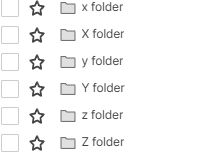
BTW, the last character is Z.
Re: Metric Widget without Summary Sheet Report?
jmyzk_cloudsmart_jp @Rebecca BdR That's great, thank you! I'll send each of you a DM to set up time.
Rashmi Shekhar